
Sintra: AI Employees
sintra.aiBusiness
4.391.00 Reviews
- Version
- 2.10.0
- Installs
- 10.00K
- Age Rating
- Everyone
Screenshots
Our Review of Sintra: AI Employees
 Analysis by Appyee
I approached Sintra: AI Employees as a business assistant app, not as a replacement for a colleague who can make decisions and take responsibility. That distinction matters: an AI helper is most useful when it takes a first pass at routine work and leaves me in charge of checking the result. Sintra, from sintra.ai, is aimed at people who want that kind of support in one place, and its playful framing makes the idea feel less like configuring another office tool.
The practical question is whether that support earns a place in your routine. I’d judge it by the tasks it can reliably help you move forward, how much checking its output needs, and whether the cost still makes sense once you know what you actually use. My view is that it is worth exploring for low-risk, repeatable work, but I would not hand it sensitive or consequential tasks without careful review.
Getting Started and Deciding What to Delegate
Installing Sintra: AI Employees is a breeze. Available on both Android and iOS, you just download it, sign up, and boom—you're in! The onboarding process is smooth, guiding you through setting up your first AI employee. These virtual assistants come with a variety of skills tailored to your needs, whether it’s managing your schedule, keeping track of emails, or even providing a little motivation on a tough day.
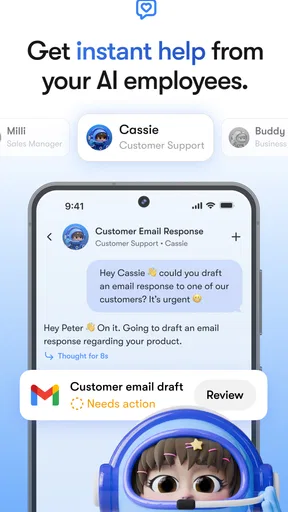
That first setup is also a good time to decide what “help” means in your own workday. I’d start with one bounded task rather than asking an assistant to take over a whole process. For example, a small-business owner could ask for a draft reply to a routine enquiry, then check the wording and send it themselves. This keeps the time-saving part while preserving a human check on promises, pricing, and tone.
A useful habit is to give a clear brief: who the message is for, what outcome you want, and what the assistant should avoid claiming. When a result misses the mark, I’d refine the instructions instead of simply repeating the same broad request. That makes the next attempt easier to assess and helps reveal whether the task is a good fit for an AI assistant at all.
Features That Stand Out
Once I got my AI employee up and running, I was blown away by its capabilities. Sintra allows you to customize your AI’s personality and skillset. Are you looking for a serious assistant who keeps things professional, or a more laid-back assistant who cracks a joke now and then? The choice is yours!
That flexibility can be useful beyond personal preference. A customer-facing draft may need a calm, clear voice, while brainstorming social copy can benefit from a looser style. I’d still treat personality as presentation, not proof of expertise: a confident tone does not guarantee an accurate answer. For anything that represents a business, I would check factual details and edit the final wording before it leaves the app.
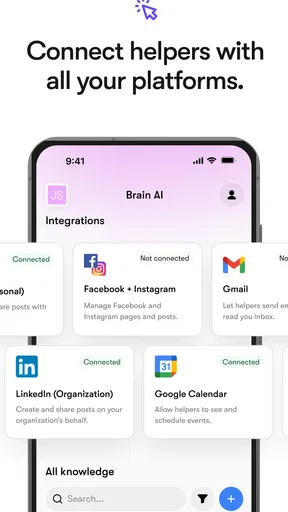
The app integrates seamlessly with your calendar and email, ensuring you never miss a meeting or important message. The AI can even draft responses for you—a lifesaver when you're swamped. And if you’re forgetful like me, the reminders feature is a godsend!
Connected work tools can save switching between apps, but they also make it sensible to be selective. I would begin with the minimum access needed for the job and avoid putting confidential client information into a prompt unless I had first reviewed the relevant privacy terms and was comfortable with them. For a draft, a short summary with identifying details removed may be enough. This is a practical safeguard, not a claim that every kind of data is treated in a particular way.
There is also a trade-off between convenience and oversight. A draft can get me past a blank screen, but it still needs a careful read for missing context, an incorrect commitment, or a tone that does not suit the recipient. I find AI output most useful as a starting point; it should not become an automatic send button for sensitive conversations.
Everyday Use and AI Interaction
Interacting with your AI employee feels natural. You can type or use voice commands, and it responds almost instantly. I found myself using it daily to check my schedule, set reminders, and even ask for a quick weather update before heading out. It's like having a personal assistant who doesn’t need coffee breaks.
A realistic use case is the messy start to a workday: I have a few meetings, several messages to answer, and a task I keep putting off. I could use the assistant to turn a rough note into a clearer draft, check what is on my schedule, and set a reminder to revisit the task. The value is not that it runs the day for me; it is that it reduces small bits of friction so I can focus on deciding what deserves attention.
For better results, I’d keep requests specific and separate unrelated jobs. Asking for a concise reply to one email is easier to evaluate than combining email triage, planning, and strategy in one vague instruction. I would also review reminders and calendar details rather than assuming a spoken request was interpreted perfectly. Voice can be convenient when my hands are busy, while typing is usually better when names, dates, or careful wording matter.
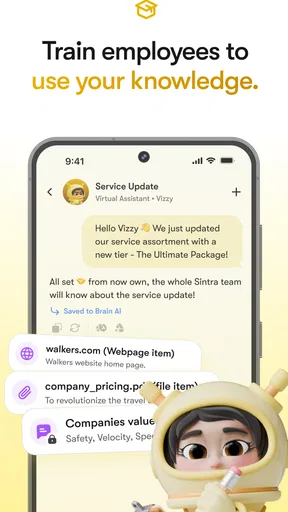
Another cool feature is the ability to train your AI. The more you use it, the better it understands your preferences, making it more efficient over time. Just think of it as investing in a new hire who gets better with every task!
I’d approach that learning process as gradual calibration, not a reason to assume the assistant will remember every preference or infer unstated context. If a particular format works well, I’d say so plainly and reuse that guidance when a task matters. Keeping a few examples of approved wording can also make it easier to judge whether future drafts are genuinely closer to what you need.
How It Fits Beside Familiar Work Tools
Sintra sits in a space that overlaps with general-purpose AI chat tools, calendar and email apps, and conventional task managers. A chat tool may be a better choice if you only need occasional answers or open-ended brainstorming. A calendar or task app is usually the clearer option when your main need is dependable scheduling and a straightforward record of what is due. Sintra’s appeal is the idea of shaping assistants around work needs rather than treating every request as a blank conversation.
That distinction does not automatically make it the best tool for every team. If several people need shared ownership, approvals, audit trails, or a carefully controlled workflow, I would compare it with established business software built around those requirements. An AI assistant can help prepare material, but it is not a substitute for a process that assigns responsibility and makes decisions visible to the people involved.
For an individual or a very small operation, the more useful comparison is often between doing a routine task from scratch and using AI to make a first draft. I’d test one recurring job for a few days and ask whether the editing time is lower than the time saved. If the output needs extensive correction every time, a saved template or a basic automation may be more predictable.
What Could Be Better?
While Sintra: AI Employees is pretty impressive, it’s not without its quirks. Occasionally, the AI might misinterpret a command or struggle with complex tasks. However, these hiccups are rare, and the developers seem committed to rolling out regular updates to improve functionality.
That limitation is important when a task has several dependencies or a high cost for getting something wrong. I would not rely on an AI-generated answer as the final word on legal, financial, medical, or employment decisions. Nor would I ask it to send a delicate customer response without reading it closely. The safest fit is work where I can spot a mistake, correct it, and remain accountable for the result.
There is a learning curve in deciding which assistant or working style fits a task, and customizing behavior takes some attention upfront. That effort is worthwhile only if the same kind of work comes up often enough to benefit. If you need help once in a while, a simpler tool may involve less setup and fewer decisions.
Another aspect worth mentioning is privacy. While the app has stringent privacy policies in place, it's always wise to review them thoroughly, especially when dealing with AI and personal data.
I would make that review part of setup, alongside deciding what not to share. Business messages can contain customer names, contract details, internal plans, or other information that should not be copied into an AI conversation casually. If I cannot safely summarize a task without exposing details I need to protect, I would handle it through an approved channel instead.
Cost, Value, and Who Should Try It
Sintra is free to download, and its in-app purchases range from $39.00 to $299.99 per item. Those are the confirmed purchase facts I would use to judge the commitment; the range alone does not tell me which paid option suits a particular person or what each purchase includes. I would check the app’s current purchase screen carefully before paying, rather than assuming that free access covers every capability or that a higher-priced item is automatically better value.
The app has a 4.8 average from 499 ratings, with 63 written reviews, and has reached over 10K installs. It is rated Everyone, was released on July 23, 2025, and its current version is 2.7.2, with Android 7.0 as the minimum operating-system requirement. Those figures offer useful context, but they do not tell me whether a paid option will save enough time for your particular workload.
To judge value, I’d first use the free access for a narrow, repeatable task and keep track of how much editing the output needs. Then I’d compare that result with the time and effort involved in doing the task manually or using a tool I already have. Only consider paying if the assistant consistently improves a workflow you actually use; a purchase is harder to justify for a novelty or a job you rarely do.
Sintra is most promising for people who regularly write routine messages, organize their own workload, or want a conversational way to get an initial draft moving. It may also suit someone who enjoys trying different assistant styles and is willing to check the work. It is a weaker match for people who want a fully automated, hands-off employee, need strict team controls, or prefer simple tools with no AI interaction.
Final Thoughts
Overall, Sintra: AI Employees is a fascinating glimpse into the future of personal assistant technology. It’s versatile, user-friendly, and downright fun to use. Whether you’re a busy professional looking to streamline your day or someone who just loves cutting-edge tech, this app is definitely worth checking out.
My recommendation is to treat it as a helper for drafts, reminders, and getting routine work started—not as a substitute for judgment or a reliable owner of complex projects. Try a low-risk task first, check how much correction it needs, and be deliberate about the information you share. If that small trial saves meaningful effort, exploring the paid choices may make sense; if not, there is little reason to force it into your routine.
So, why not give Sintra a try? Download it today and see just how much easier life can be with an AI employee by your side. Trust me, once you do, you’ll wonder how you ever got along without it!
Verdict
Strengths of Sintra: AI Employees
- Easy integration with existing systems.
- Customizable AI employee roles.
- Automates repetitive tasks efficiently.,24/7 availability for customer support.
- Enhances team productivity significantly.
Limitations of Sintra: AI Employees
- Requires stable internet connection.
- Initial setup can be complex.
- Limited offline functionality.
- High learning curve for new users.
- Subscription costs can be high.
Similar Picks in This Category
View All
LinkedIn: Community & Network
LinkedIn3.8

Zoom Workplace
zoom.com4.1

Microsoft Teams
Microsoft Corporation4.6

Meta Business Suite
Meta Platforms, Inc.4.6

Webex Meetings
Cisco Systems, Inc.4.5

TeamViewer Remote Control
TeamViewer4.4
Frequently Asked Questions
What is Sintra: AI Employees?
Sintra: AI Employees is an innovative mobile application designed to enhance productivity by utilizing AI-driven virtual employees. These AI employees can manage tasks, schedule meetings, and provide insights, making it an ideal tool for busy professionals seeking to optimize their workflow on both Android and iOS platforms.
How does Sintra: AI Employees improve productivity?
Sintra: AI Employees improves productivity by automating routine tasks, offering personalized suggestions, and managing schedules efficiently. The app uses advanced AI algorithms to analyze your work habits and provide tailored assistance, freeing up time for more strategic tasks and decision-making.
Is Sintra: AI Employees compatible with other productivity tools?
Yes, Sintra: AI Employees is designed to integrate seamlessly with popular productivity tools such as Google Calendar, Slack, and Microsoft Teams. This compatibility ensures that users can enjoy a cohesive experience, allowing the AI to interact with and enhance the usage of existing tools.
What are the privacy measures in Sintra: AI Employees?
Sintra: AI Employees prioritizes user privacy by using robust encryption methods to protect sensitive data. The app adheres to strict privacy policies and complies with international data protection regulations, ensuring that user information remains confidential and secure at all times.
Are there any subscription fees for Sintra: AI Employees?
Sintra: AI Employees offers a free basic version with essential features, while a premium subscription is available for users seeking advanced functionalities. The premium version includes enhanced AI capabilities and additional integrations, providing a comprehensive solution for maximizing productivity.
